


At 4 a.m. on October 16, a scheduled job started on my laptop. It runs competitive intelligence for a data and AI software company I advise. By 9:43, it had read 118 pages across those nine competitor websites and written a research report on each of the nine competitors and one on the client. It turned those reports into a competitive brief and filed everything in the client’s Notion workspace. An unsent email sat in my drafts for me to review first.
I built the system after a review I did in June. I checked 49 claims in the client’s competitive sales decks against recent research, and 25 of them needed updating. A strength the decks called unique, support for a specific banking regulation, had become contested after three competitors published their own material on that regulation.
In my last post, I described four layers I now see underneath every go-to-market (GTM) system I’ve built that works: context, skills, orchestration, and evals, the checks on a system’s output before it reaches a rep or a customer. I promised to build a competitive intelligence (CI) system on those layers, and this post walks through the one I run for clients.
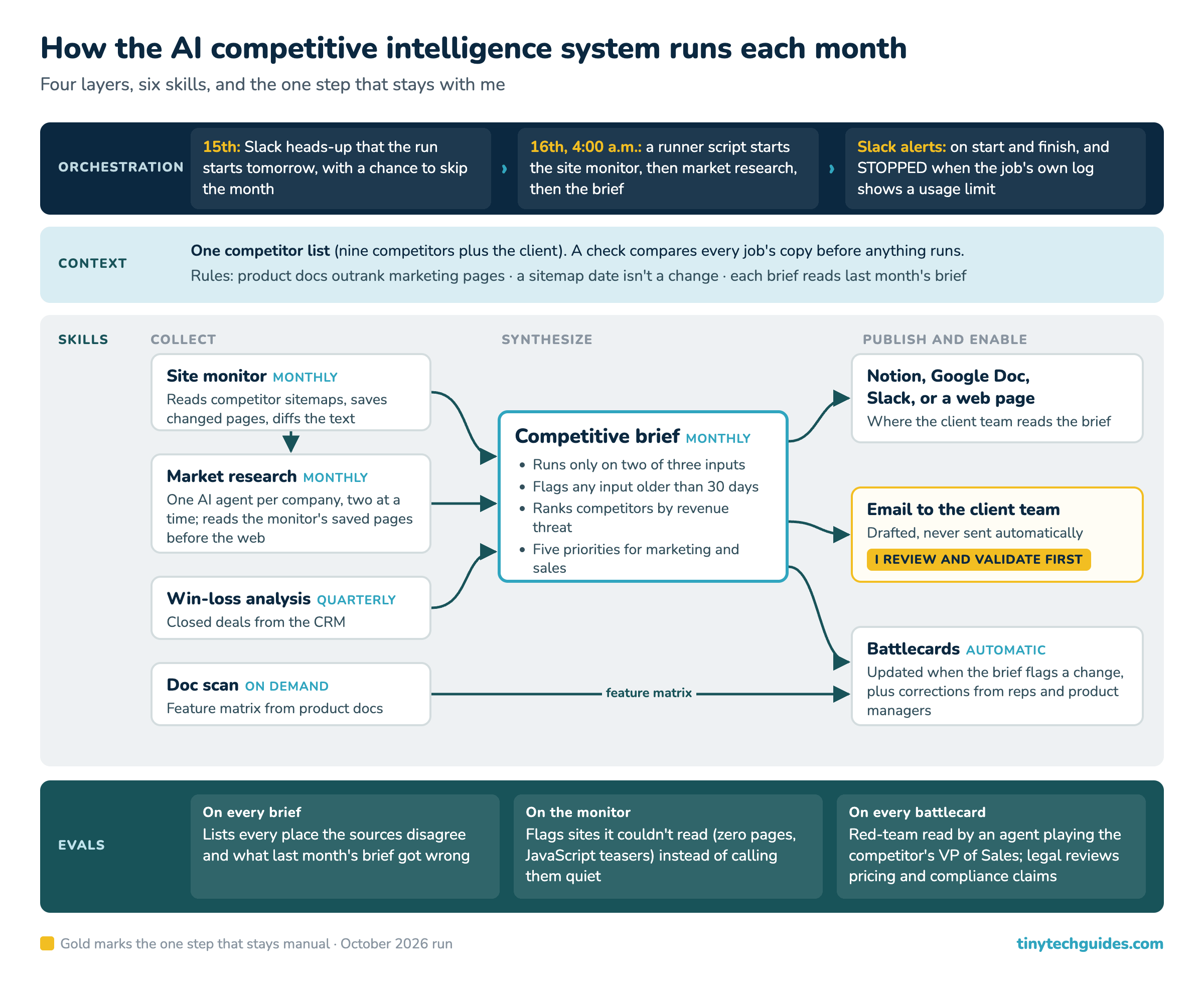
The monthly competitive intelligence run, layer by layer. The gold step is the one I still do by hand.
If you want to run the site monitor yourself, I’ve packaged it as an installable kit for paid subscribers, with the details at the end of this post.
Every job starts from the same competitor list
Every job in the system should work from the same list: nine competitors plus the client. That’s harder than it sounds, because three of the jobs (the site monitor, market research, and the documentation scan) each keep their own copy of the list. So before anything runs, a check compares the three copies. Without that check, a new competitor can get a research report every month while the agents miss its website changes.
The jobs also read a few rules I added after getting things wrong. Field intelligence from sales reps and product managers overrides every other source, and product documentation outranks marketing pages. A date in a sitemap (the file a website publishes to list its pages) isn’t evidence that a page changed, and each month’s brief reads the previous one so it can point out what the old one got wrong.
Six Claude skills, each with one job
The CI system uses six Claude skills, which are packaged jobs that each do one thing and pass their output to the next. Three run every month on their own. Win-loss analysis runs every quarter, the documentation scan runs when I call it, and battlecards update whenever the brief flags a change.
• Site monitor (monthly) — Reads each competitor’s sitemap and the pages that changed; hands off page-by-page text differences and a summary of what changed.
• Market research (monthly) — Reads the site monitor’s saved pages first, then the web, one AI agent per company on the list; hands off a dated report for each company and a scorecard of how much each competitor threatens the client.
• Competitive brief (monthly) — Reads at least two of three inputs (market research, site monitor, and win-loss); hands off a ranking of which competitors threaten the most revenue, five priorities for marketing and sales, and every place the sources disagree.
• Documentation scan (on demand) — Reads each competitor’s product documentation; hands off a feature matrix that ends with what it means for the battlecard.
• Win-loss analysis (quarterly) — Reads closed deals from the client’s customer relationship management (CRM) system; hands off why deals were won or lost, by competitor.
• Battlecard (automatic) — Reads all of the above plus corrections from sales reps and product managers; hands off a two-page card for reps and a detailed card for whoever trains them.
My competitive intelligence prompt workflow from March 2025 was one prompt plus nine steps you ran by hand, and as I showed in an earlier post, a fresh Claude session can now write a prompt like that about as well as I can. It can’t write the handoffs between jobs. The brief won’t run on a single source, and it flags any input older than 30 days, so the reader finds out when a job breaks.
The September run that burned its AI allowance in three minutes
The monthly run is where the orchestration layer lives. On the 15th, a Slack message tells me the run starts the next morning so that I can skip a month if I need to. On the 16th, a runner script starts the site monitor, then the market research, then the brief. It sends a Slack message when it starts and another when it finishes, then publishes the brief to Notion and a Google Doc, and drafts the email. A Slack channel or an internal web page works the same way, with the runner script posting the brief there instead.
On September 16, the job started at 9:07 a.m., as scheduled. Between 9:19 and 9:21, the market research skill launched all ten research agents (one for each competitor and one for the client), and each one searched and fetched pages with no cap. My Claude plan resets its usage allowance every five hours, and the agents used up the allowance that had reset at 9:10 in about three minutes, before a single report got written.
Then the Slack message said the run had finished, with the usage-limit error as its summary, because Claude’s command-line tool reports success when it stops at a limit. The skill’s instructions already said to run two or three agents at a time, but in September the agents didn’t follow them.
“A scheduled job that reports success when it has failed is worse than no job at all.”
— David Sweenor, Founder/CEO, TinyTechGuides
So I stopped relying on the instruction alone. The skill now sets hard numbers (two agents at a time, six web searches and six page fetches each), and each agent reads the pages the site monitor has already saved before it goes to the web. The runner script, which doesn’t depend on an agent following anything, reads its own log for the limit message and sends a “STOPPED” alert to Slack when it finds one. I moved the schedule to 4 a.m. so that the run starts on a fresh allowance and the next reset comes before the workday.
The October run hit a snag of its own. The site monitor failed on its first launch because the job’s Python installation was missing a library, so the runner script retried with a different Python installation and finished. I know about it only because the run logs everything that went wrong, and I read the log. Without that log, October’s run would have looked exactly like a clean one. If you’re a CMO or a private-equity operating partner, ask your team whether its automated jobs keep a log like this one, and who reads it.
The checks that run before anyone reads the brief
Every brief has to list the places where its sources disagree, and October’s brief opened with three corrections to September’s.
September’s errors fell into three kinds. One competitor had removed a product limitation that reps had been raising in deals, and that question came off the battlecards. Another’s claim to a 2026 analyst ranking couldn’t be sourced to the analyst’s own publication, so the ranking stays off the battlecards until the primary source turns up. A third competitor’s AI agents now wait for user approval before acting, which means the brief can no longer say they act without it.
Before a battlecard goes to sales, a separate AI agent with no stake in the draft reads it like the competitor’s VP of Sales, looking for the claim a rep would lose a deal on. Every pricing, security, or compliance claim also gets a tag that routes it to the client’s legal review.
The system also reports which websites it couldn’t read. One competitor’s site returned zero pages for two months running because its news had moved to a section the monitor wasn’t set up to watch. Two others render their blog posts in JavaScript, and the monitor saves a teaser of 36 to 60 words rather than the full article. The brief has to flag all three as unreadable; otherwise they look like competitors with nothing new to report.
What I still do by hand
One step stays with me: I review the output before it goes to the client team. The email waits in my drafts until I’ve read the brief and checked anything it flags as unverified. A brief can read well and still be wrong, and I don’t send a client AI slop.
Reading the brief takes me about an hour. A wrong claim that reaches the client’s sales team is repeated to every prospect until someone catches it, so the hour is time well spent. The run itself takes almost six hours, and none of it needs me. Nobody tracked how many hours this work took when the client’s team did it by hand, so I have no before-and-after comparison to offer.
Four questions before you build one
Product marketers are already reaching for AI in competitive work. In a May 2026 Wynter survey of 101 B2B SaaS product marketers, “47% of PMMs said their battlecards go stale within three months.”[1] Run these four checks on your own CI for an ordinary month.
Context: Does every competitive job read the same list of competitors, and does anything check that the copies match?
Skills: When a competitor changes its documentation, which job notices, and what does it hand to the next one?
Orchestration: When your scheduled run fails at 4 a.m., who finds out, by what channel, and how long does it take?
Evals: Does this month’s brief say what last month’s got wrong, and which competitor websites can your monitor not read?
If you’re not sure about the third, start there. Setting up a competitive monitoring system like this one is part of the AI GTM engineering work I do with clients. I’m happy to spend 30 minutes walking through where your CI breaks and which layer to build first.
