


Earlier this month, I was heads down working on a Gartner Magic Quadrant (MQ) submission for a client. Anyone who’s been through one knows what a pain in the butt they are. There’s an unreasonable deadline that doesn’t move, a long list of questions, and a pile of evidence that has to be assembled and written so that it survives a fast read from an analyst (or their LLM). I was running my Claude sidekick to help put the submission package together.
Then all of a sudden, wouldn’t you know, Claude stopped and handed me an overloaded message. I refreshed, waited a minute, tried again, and got the same thing, so I went to status.claude.com and found a system outage posted there. Well, that was a bummer, and it wasn’t the first time I’d seen the overloaded error.
So what do you do? Do you call it a day and grab a tasty beverage, email the client, or ask a stubborn analyst firm to move a date? This raises an interesting point because most of my clients and colleagues now heavily rely on Claude, ChatGPT, or Gemini for a significant part of their work.
While we’re here, if you want to know what I really think about the Gartner process itself, I wrote that up last year while helping a different client through their submission. They move their dates all the time, but we don’t have that luxury.
Can you survive an outage, or did you just run out of tokens?
Depending on how heavy a user you are, you may not have encountered an outage, and that’s fine, because the ordinary version has the same symptom and the same remedy. You blew through all of your tokens and hit a usage limit partway through your work, and the session tells you to come back in a few hours. For most, they’ll be just as stuck as I was. Whatever you were going to finish today, it’s not going to happen.
I’m a huge fan and an advocate of Claude, and anyone who’s been following this series already knows it. I moved my marketing work to Claude Code more than a year ago. I’ve written a stack of articles about how to run a marketing practice on it, and I still use it most days for most things. Nothing here changes any of that, and none of this is a slam against Anthropic.
This may surprise you, but the specific LLM matters a lot less than you’d think for most tasks. Sure, they each have their own quirks, and they’re better and worse at different things, but with the same rules and workflows, any of them will get the job done. Your work either survives the LLM going away for an afternoon or it doesn’t, and you find out which one is true on the day you can least afford to find out.
What broke, and what didn’t
Despite wanting that tasty beverage, I didn’t have to wait. I simply switched over to Codex, which is OpenAI’s command-line tool, and carried on in the same folder, on the same submission, in the same terminal window. It could just as easily have been Gemini CLI. I delivered the submission on time.
The switch was relatively painless. The one thing that changed was how I start a job: Codex doesn’t take a slash command, so instead of typing /edit-video, I asked Codex to use /edit-video. Same instructions, same result.
Everything else sat exactly where I left it. The project rulebook was a file on disk. The 55 workflow files in my TinyTechGuides folder, and another 31 in my consulting folder, were files on disk. The 124 memory facts were files on disk. So were the 1,056 tracked files of actual client work, research, transcripts, and meeting notes. The connections into Gmail, Sheets, Analytics, and Buffer were still running and still authenticated. None of it lived in a vendor’s database, and none of it needed anybody’s permission to open.
That’s when something I’ve been advocating for six months finally clicked. I’ve written before that the memory is the asset, which is true and still undersells it. The asset is the whole system you set up, and the memory is only one piece of it. Your rules, your workflows, your memory, and your live connections to other tools are all files, which is exactly why none of them went anywhere. What I’ve been calling my AI system (or Marketing OS) is mostly a folder of markdown files in a git repository, and the AI is the part I rent monthly.
“Your rules, your workflows, your memory, and your connections are the asset, and every one of them is a file.”
So take a minute and count your own. Prompts that live in a chat history, brand rules that live in a conversation you had back in March, and a process that lives in your head all leave with the session. Files stay.
Running the same system on a different engine
My setup is deliberately boring, and the picture below is the whole of it. I keep the file tree on the left, a markdown preview on the top right, and a terminal along the bottom where the agent actually runs. The editor isn’t doing anything clever. The only thing it buys me is being able to watch my files while something else works on them, which matters more than it sounds like it should.
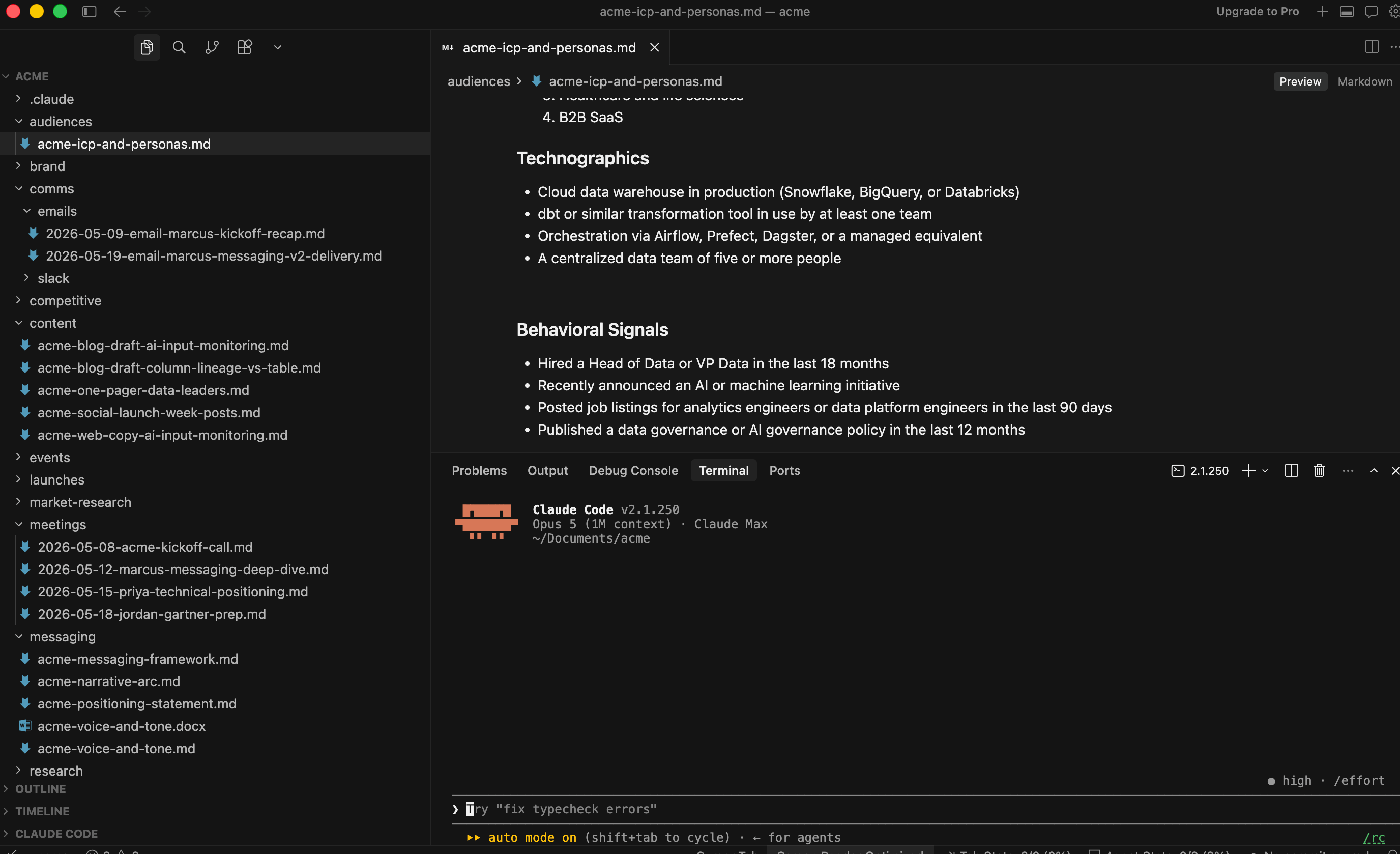
Adding a second engine takes two commands.
npm install -g @openai/codex
npm install -g @google/gemini-cli
That gives you Codex from OpenAI and the Gemini command-line tool from Google. Both run in the same terminal, in the same folder, against the same files. From there, you have three things to point at them, and only three.
Context. Codex looks for a file called AGENTS.md instead of CLAUDE.md. Don’t copy the file over, because then you have two rulebooks drifting apart, which is the same one-source-of-truth mistake I made with my content calendar. Ask Codex to make AGENTS.md a symlink to CLAUDE.md, which is a pointer to the original rather than a copy of it, and it will set that up for you. You end up with one file that answers to two names. Gemini is easier still, since you can point it straight at CLAUDE.md in its settings file.
Workflows. Your workflow files are markdown, which is the part most people miss. Codex and Gemini don’t take /edit-video as a command, but ask either one to use /edit-video and it goes and finds .claude/commands/edit-video.md and follows what it says, because that file is a set of instructions and nothing more. You lose the keyboard shortcut, and you keep the work.
Connections. This was the only piece that needed real work. Your live connections into Gmail, Sheets, and the rest have to be registered once per tool, and the formats differ, since Codex keeps them in one global config while Gemini keeps them per project. I didn’t write any of that by hand. I asked Codex to read the configuration I already had and write its own version, and it did.
Get one thing right while you’re in there. Keep your tokens in environment variables rather than pasting them into a config file that ends up in your repository. Codex enforces this and refuses a literal token, which is the right call. Gemini will happily let you do the sloppy version, so don’t take it up on the offer.
All in, this is about five minutes, once. The models will do most of it for you if you tell them what you want.
I made this argument to CIOs two years ago
Back in January 2024, I wrote the CIO’s guide to generative AI vendor selection, and the second question I told technology leaders to ask a vendor was who owns and controls the data. Those readers had procurement teams and security reviews standing behind them. Marketing has to answer the same question for itself now, because nobody in IT is answering it on our behalf.
If you’ve been reading this series, you’ve already done most of the work without my telling you why. Over six articles, I’ve argued for putting your rules in a project file, turning your prompt workflows into skills, keeping a real memory, and wiring live connections into the tools you already use. Not one of those is a Claude feature. Each one’s a file, and that’s exactly why they were still there on an afternoon when the model wasn’t.
Where to start
None of this is a prediction about Claude. Outages happen to every provider, and usage limits catch everybody on a heavy week. That is the deal when you rent your intelligence by the month, and it isn’t going to change. Everything comes down to one question. Does your working life have a single point of failure sitting in the middle of it? Most marketing teams have never stopped to ask.
So ask it. Picture your primary model going dark for six hours tomorrow, right in the middle of the one thing you can’t move. What would you still be able to do? If the answer is not much, a different vendor won’t save you. Move your rules, your workflows, and your accumulated context out of a chat window and into files you own, then spend the five minutes it takes to show a second engine where to find them.
Own the work. Create the process. Set up the system. Rent the model.
Frequently asked questions
What does it mean to future-proof a marketing workflow?
Future-proofing a marketing workflow means keeping the parts of your work that last in files you own rather than inside one vendor’s product. Your project rules, workflow instructions, accumulated memory, and client work all sit as plain markdown in a folder on your disk. An AI model reads those files and acts on them, so when one model is unavailable, you point a different one at the same folder and carry on. The model becomes the part you rent, and the work stays the part you own.
Do I have to stop using Claude to do this?
No, and that is the point. Setting up a second engine changes nothing about how you work day to day. I still use Claude Code most days for most things, and Codex and Gemini sit there unused until I need them. Installing them costs about five minutes once, and the files they read are the same files Claude already reads. It is a spare tire, not a new car.
How is this different from paying for a second AI subscription?
A second subscription gives you a different chatbot and does nothing for the work you have already built up. When your prompts, brand rules, and processes live inside one vendor’s chat history, a second subscription drops you into a new empty window with none of it. Moving that accumulated context into files first is what makes any model useful to you. The subscription is the cheap part, and the portable context is what carries over.
Will my Claude skills run in Codex or Gemini?
Yes, with one difference in how you start them. Claude Code lets you type a slash command such as /edit-video. In Codex and Gemini, you ask the model to use /edit-video instead, and it goes and finds the markdown file behind that command and follows what it says—same instructions, same output. You give up the keyboard shortcut, and you keep the workflow.
How long does the setup take?
About five minutes, once. Two npm commands install Codex and the Gemini command-line tool. After that, you need to connect three things. A symlink lets Codex read the project rules you already wrote, your workflow folder needs no change at all, and your live tool connections get registered once per tool. Ask the model to handle the configuration, and it will read what you have and write its own version.
Where do I start if all my prompts live in a chat history?
Start by moving them out. Open a folder for the project, put your standing rules in one file, and save each repeated prompt as its own markdown file with a name that says what it does. That alone gets the work out of a vendor’s database and onto your disk, which is what matters. Adding a second model afterward takes minutes, because the hard work of writing things down is already behind you.
About David Sweenor
David Sweenor is the founder and host of the Data Faces podcast, where he talks with the people who are making data, analytics, AI, and marketing work in the real world. He is also the founder of TinyTechGuides and a recognized top 10 AI thought leader and international speaker who specializes in practical business applications of artificial intelligence and advanced analytics.
With over 25 years of hands-on experience implementing AI and analytics solutions, David has supported organizations including Alation, Alteryx, TIBCO, SAS, IBM, Dell, and Quest. His work spans marketing leadership, analytics implementation, and specialized expertise in AI, machine learning, data science, IoT, and business intelligence. David holds several patents and consistently delivers insights that bridge technical capabilities with business value.
Books
- Artificial Intelligence: An Executive Guide to Make AI Work for Your Business
- Generative AI Business Applications: An Executive Guide with Real-Life Examples and Case Studies
- The Generative AI Practitioner’s Guide: How to Apply LLM Patterns for Enterprise Applications
- The CIO’s Guide to Adopting Generative AI: Five Keys to Success
- Modern B2B Marketing: A Practitioner’s Guide to Marketing Excellence
- The PMM’s Prompt Playbook: Mastering Generative AI for B2B Marketing Success
Follow David on Twitter @DavidSweenor and connect with him on LinkedIn.