

Many of my clients are gravitating towards Claude Code for marketing. This is surely a step in the right direction. However, most of them are not widely using the Skills that you can create with Claude. In fact, I’ve only recently understood their power and how to use them to their fullest extent. I’ve built a /podcast-prep skill, a /podcast-production skill, a /send-invoice skill, along with many others. In total, I’ve created 60+ of them across two working folders, one for my TinyTechGuides business and another for client work. When I first started using skills, they mostly worked, but at times, they sometimes didn’t consistently do what I wanted. Little did I know their true power.
One of my skills is /build-content-calendar, which is pretty effective. Unfortunately, after using it extensively, I started noticing something off. I’d kept the content calendar in two places, a local CSV and a Google Sheet. Some skills updated the CSV, while others updated the Sheet. When I noticed the discrepancies, I would ask Claude to sync or fix them by hand and move on. A few days later, the two files were out of sync again. The skills had run fine both times. They each edited whichever file they knew about. Turns out, I broke a cardinal rule: one source of truth — I should have had the local copy simply reference the Google Sheet version.
“I fixed it. A few days later, it was broken again.”
The same week, I caught my /podcast-prep skill churning out question lists with em-dashes I’d banned, and it kept opening with generic “tell us about yourself” questions even though I’d told it to always pull from the guest’s recent LinkedIn posts. That’s when I realized the skills were doing exactly what they were told to do. Nothing more and nothing less. What was missing? Well, I only had part of the recipe — nothing was telling the Skills what was true here. Three more components fixed it.
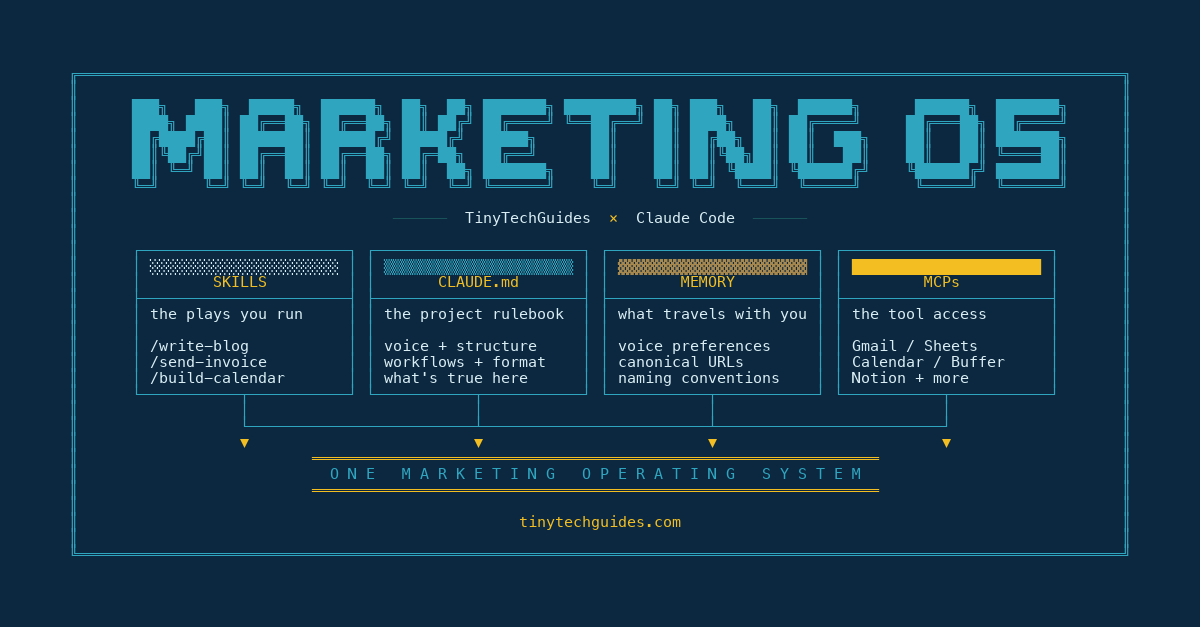
A Skill on its own is one of those prompt workflows I worked on last year.[1] What’s the secret? Well, if you combine four components, most of the quirks you keep noticing stop being structural in nature. Here’s what an effective Claude stack looks like, and what each component does:
Skills run the plays: packaged workflows you trigger with a slash command, like /podcast-prep, /send-invoice, or /podcast-production.
CLAUDE.md sets the rules: the project’s rulebook, which Claude reads at the start of every session in that folder.
Memory holds the truth: the personal preferences, corrections, and decisions that follow you across every project.
MCPs connect the tools: live connectors into Gmail, Sheets, Calendar, WordPress, and the rest of your stack.
Each ingredient on its own is just an ingredient. Combined in the right kitchen, they compound into a working stack.
A Skill alone is a prompt workflow
Earlier this month, I made the marketer’s case for Claude Code.[2] That post explained why marketers should run Claude as a project tool. This piece covers the four components that make it stick once you do.
A Skill is a packaged recipe Claude calls with a slash command. It’s an atomized set of instructions for whatever you want to do in marketing. The recipe lives in a folder, alongside any helper scripts or examples it needs.[3] You type /podcast-prep, Claude loads the instructions in the folder, and the skill runs. Type /send-invoice and you get a different recipe. The skill is the “how” of a repeated job. The great thing about them is that they load when you call them, not in every session. Why do you care? It saves tokens and keeps the context window from getting too bloated.
In isolation, that’s all it is. A Skill is a recipe with no kitchen, no pantry, and no cook’s preferences. The recipe says, “build a guest prep doc in this format.” And as we know, every recipe has the ingredients and the steps you need to follow to create that delicious meal. It does not say which guest you’re prepping for, whether the questions should lean technical or strategic, or which generic openers I’ve already banned. If you run the same /podcast-prep skill for two different guests, you’ll get the same mistakes both times. Nothing provides context or tells the skill what’s true about this guest, this episode, or what I want to avoid.
That’s where CLAUDE.md comes in. CLAUDE.md is the project’s rulebook, and Claude reads it every time you start a session in that project’s folder. The Skill brings the workflow, and the CLAUDE.md tells the Skill what’s true in this room. Together, they produce a coworker. Without CLAUDE.md, you’ve got a contract writer who hasn’t read the brief, which contains the bans, link conventions, and project-specific rules.
In this project, my CLAUDE.md tells the /podcast-prep skill to pull guest questions from the guest’s recent LinkedIn posts and prior podcast appearances, not generic conference talking points. It tells the skill that em-dashes are banned in the prep doc, that guest titles must match what’s on LinkedIn (not what’s on the company website), and that every question list opens with something tied to the guest’s recent work. The same /podcast-prep skill ran for two different guests, producing two different sets of prep notes: same recipe, different room.
“A Skill without CLAUDE.md doesn’t know which client it’s working for.”
Which fixes one half of the brittleness. CLAUDE.md handles the project. The other half is what travels with you across projects.
A CLAUDE.md alone is a wiki nobody reads
CLAUDE.md is the project-scoped rulebook. Drop a file named CLAUDE.md at the root of a project, and Claude reads it every session you start in that folder. The file contains voice rules, naming conventions, and project-specific bans such as “no em-dashes” or “no Amazon book URLs.”
It’s also useless on its own. A 500-line rulebook is wallpaper if nothing reads it, and rules in a file you can’t trigger don’t bind anything. Without memory, the rules stop at the project’s edge. CLAUDE.md says “first person, sentence case headings.” It does not say I prefer “leadership” over “the board.” That preference is mine, and it follows me across every client folder I open.
“Without memory, every CLAUDE.md is the same lecture I have to repeat in every project.”
Memory does the inverse of CLAUDE.md. Memory is what Claude remembers about how you actually work in this project, across every session. It holds your voice preferences, the decisions you’ve made about how to phrase things, and the file naming conventions you’ve earned the hard way. Each project gets its own memory folder, which lives outside the repo in your home directory, and Claude reads it at the start of every session.
In this project, the CLAUDE.md handles the format rules. Memory adds the word-level preferences I’ve corrected too many times to trust myself to remember. Project rules and personal preferences live in different files for a reason. Together, they steer the voice every time I work in this folder.
Some teams write the same file as AGENTS.md instead.[4] It’s the cross-tool convention stewarded by the Linux Foundation’s Agentic AI Foundation, read natively by Codex, Cursor, and 20-plus other tools. Anthropic’s tooling reads CLAUDE.md, and some projects keep both files.
Project rules are sorted. Personal preferences live in a different file. That file has its own way of disappointing you when it works on its own.
Memory alone is sticky notes taped to your monitor
Memory in Claude is a folder of markdown files that the system reads at the start of every conversation, regardless of project. Mine has more than fifty entries. Here are five of them, lightly anonymized:
Sheet 1BojY1g is canonical for the calendar. Don’t edit the local CSV.
I prefer “leadership” over “the board.” Applies in every project.
Pull quotes attribute to “David Sweenor, Founder/CEO, TinyTechGuides.”
Buffer’s createPost API does not ingest video from URLs. Manual upload only.
Don’t update episodes.md or guest-list.csv until after the episode is recorded. Guests cancel.
Five real entries. They’re project-agnostic. They follow me from this TTG repo into a Posit project into a Solidatus project, every time I open Claude. Memory is what Claude knows about me, regardless of what I’m working on. Of course, I also have a memory for each of my client folders and, in some cases, client projects.
It’s also sticky notes on the monitor. The notes are useful when I’m sitting at the desk reading them. They don’t open Notion or send the Buffer post. They certainly don’t check what’s next on the Sheet. Memory tells Claude what I’ve decided. Acting on those decisions still takes me reaching for the keyboard. It’s the kind of bugaboo that looks fixed every time you stare at it.
Memory holds the Sheet ID, but something else has to actually read the Sheet. Memory remembers I want video posts queued in Buffer, but something else has to post them. The memory entry is just text, Claude can’t act on it without a connector to the tool itself.
“Memory tells Claude what you decided. MCPs let Claude do something about it.”
Which inverts the question. What does an MCP look like as the only component? It is loud, connected, and not very useful.
An MCP alone is an API call you’re making by hand anyway
Last quarter, I asked Claude to track down a follow-up email I’d sent a prospect two weeks earlier. The Gmail MCP happily searched 200 messages and returned 47 of them. None were the thread I was chasing.
That’s an MCP doing exactly what an MCP does. An MCP, or Model Context Protocol server, is a connector that lets Claude operate tools like Gmail, Sheets, and Calendar.[5] Anthropic introduced the spec in late 2024, and it’s now the standard interface for AI applications to talk to external systems. If you’ve ever wanted Claude to send a follow-up email instead of drafting one for you to copy-paste, MCPs are how.
On their own, MCPs are raw access. The Gmail MCP can search your inbox. The Sheets MCP can read any range. Neither one knows which thread is the prospect call you’ve been chasing or which tab is the canonical source of truth. Raw access without instructions is “search 200 emails for X” on repeat, which is mostly the API call you’d be making by hand. You’ve just stuck Claude in the loop.
That’s where Skills come back in. A Skill is a recipe that turns “search 200 emails for X” into “find the threads with my recent prospect contacts and draft three follow-ups in my voice.” The Skill carries the workflow. The MCP carries the tool access. Skills plus MCPs is the difference between an API call and a finished workflow.
“An MCP without a Skill is a kitchen without a chef.”
My /podcast-production skill bundles ten clip drafts and queues them in Buffer in about ninety seconds. Each draft has the correct ATTACH header, so I know which MP4 to upload manually. The skill knows the format from CLAUDE.md, the Buffer account from memory, and the API call from the MCP. Pull any component, and the workflow stops being a workflow.
What the four components buy you
By the time you’ve stacked all four, you’ve built an operating system. Skills hand work to CLAUDE.md, which gives memory the rules. Memory feeds MCPs, which serve the next Skill. The output of one component becomes the input to the next in every session.
Consider the following questions:
Are your Skills reading the project rulebook, or are they running on default voice?
Does your CLAUDE.md exist in every project you switch between, or just the one you set up first?
Have you corrected the same preference more than twice this month? That’s a memory miss.
Are you still hand-copying data from Gmail, Sheets, or your CRM into chat?
Gartner put a sharper point on it at the D&A Summit in Orlando this March. Expecting AI to compensate for delayed upgrades, siloed teams, and missing context is “wishful thinking.”[6] Gartner prescribes “a well-designed context layer” instead. The four components in this article are that context. The Skill is the tool that runs on top. The compounding makes them a marketing moat.[7] Tools change, and components compound.
The next time your Claude setup feels like it’s not working quite right, look down. Whatever Skill you wrote is doing its job. The job is just bigger than one component.
More on the four-component stack every other Tuesday (or when I get around to writing about it) at tinytechguides.com or insights.tinytechguides.com. Skills and CLAUDE.md, memory and MCPs, and what breaks when any one of them goes missing. Subscribe if you want the next one in your inbox.
Frequently asked questions
What is a Claude marketing OS?
A Claude marketing OS — sometimes called a Claude stack — is the four interlocking components that make Claude reliably useful for marketing work: Skills (slash-command recipes), CLAUDE.md (project rulebooks), memory (personal preferences across projects), and MCPs (connectors to tools like Gmail and Sheets). When the OS feels “quirky,” one of the four is missing or misaligned. Stacked together, they compound. The output of one component becomes the input for the next.
What is a Claude stack?
A Claude stack is the four interlocking components that make Claude reliably useful for repeated work: Skills (slash-command recipes), CLAUDE.md (project rulebooks), memory (personal preferences across projects), and MCPs (connectors to tools like Gmail and Sheets). Each component alone is limited. Stacked, they compound. Skills hand work to CLAUDE.md, CLAUDE.md gives memory the rules, memory feeds MCPs, and MCPs serve the next Skill. The output of one component becomes the input for the next.
What’s the difference between a Skill and a CLAUDE.md?
A Skill is a packaged recipe Claude calls with a slash command, like /podcast-prep or /send-invoice. The Skill carries the workflow steps. A CLAUDE.md is the project’s rulebook, located at the root of the project folder, and Claude reads it every session in that project. The CLAUDE.md file tells the Skill what’s true in this project, such as voice rules, naming conventions, and project-specific bans. Skills handle the “how.” CLAUDE.md handles the “what’s the context here.” Without CLAUDE.md, the Skill runs on the default voice.
What is an MCP in Claude?
An MCP, or Model Context Protocol server, is a connector that lets Claude operate the tools you already use, like Gmail, Sheets, Calendar, Notion, and Buffer. Anthropic introduced the spec in late 2024, and it’s now the standard interface for AI applications to talk to external systems. On its own, an MCP is raw access, like “search 200 emails for X” without context for which X matters. When paired with a Skill, the MCP becomes a finished workflow.
Why won’t a better Skill alone fix my Claude workflow?
Skills carry instructions for repeated tasks, but they don’t include project context, personal preferences, or access to tools on their own. A Skill running without CLAUDE.md doesn’t know which client it’s working for. Without memory, it forgets your preferences from session to session. The same Skill without MCPs can’t act on your tools at all. The Skill executes whatever you tell it. If nothing else in the stack tells it what’s true, the executions stay shallow. Sharper Skills don’t fix missing components.
Where should I start auditing my Claude stack?
Start with the four-question audit. Are your Skills reading the project rulebook, or are they running on default voice? Does your CLAUDE.md exist in every project you switch between, or just the one you set up first? Have you corrected the same preference more than twice this month? That’s a memory miss. Are you still hand-copying data from Gmail, Sheets, or your CRM into chat? Each “no” maps to a missing component.
Is AGENTS.md the same as CLAUDE.md?
Same idea, different filenames. AGENTS.md is the cross-tool convention stewarded by the Linux Foundation’s Agentic AI Foundation, read natively by Codex, Cursor, Gemini CLI, and 20-plus other tools. CLAUDE.md is Anthropic’s tooling convention. Both serve as project rulebooks that the agent reads at the start of each session. Some teams keep both files for cross-tool portability. The function is a project-scoped context layer, which matters more than the filename.
About David Sweenor
David Sweenor is the founder and host of the Data Faces podcast, where he talks with the people who are making data, analytics, AI, and marketing work in the real world. He is also the founder of TinyTechGuides and a recognized top 25 analytics thought leader and international speaker who specializes in practical business applications of artificial intelligence and advanced analytics.
With over 25 years of hands-on experience implementing AI and analytics solutions, David has supported organizations including Alation, Alteryx, TIBCO, SAS, IBM, Dell, and Quest. His work spans marketing leadership, analytics implementation, and specialized expertise in AI, machine learning, data science, IoT, and business intelligence. David holds several patents and consistently delivers insights that bridge technical capabilities with business value.
Books
- Artificial Intelligence: An Executive Guide to Make AI Work for Your Business
- Generative AI Business Applications: An Executive Guide with Real-Life Examples and Case Studies
- The Generative AI Practitioner’s Guide: How to Apply LLM Patterns for Enterprise Applications
- The CIO’s Guide to Adopting Generative AI: Five Keys to Success
- Modern B2B Marketing: A Practitioner’s Guide to Marketing Excellence
- The PMM’s Prompt Playbook: Mastering Generative AI for B2B Marketing Success
Follow David on Twitter @DavidSweenor and connect with him on LinkedIn.
[1]Sweenor, David. “PMM’s Prompt Playbook - Prompt Inventory.” insights.tinytechguides.com, February 21, 2025. https://insights.tinytechguides.com/p/pmms-prompt-playbook-prompt-inventory
[2]Sweenor, David. “The marketer’s case for Claude Code.” TinyTechGuides, May 1, 2026. https://tinytechguides.com/blog/the-marketers-case-for-claude-code/
[3]Anthropic. “Agent Skills Overview.” Claude API Docs. Accessed May 2026. https://platform.claude.com/docs/en/agents-and-tools/agent-skills/overview
[4]Agentic AI Foundation. “AGENTS.md.” Linux Foundation, 2026.
https://agents.md/
[5]Anthropic. “Introducing the Model Context Protocol.” November 25, 2024. https://www.anthropic.com/news/model-context-protocol
[6]Gartner. “Gartner Identifies Three Pillars for Deriving Value from AI.” Press release, March 9, 2026. https://www.gartner.com/en/newsroom/press-releases/2026-03-09-gartner-identifies-three-pillars-for-deriving-value-from-ai
[7]Sweenor, David. “Marketing moats: what of that?” TinyTechGuides, May 8, 2026. https://tinytechguides.com/blog/marketing-moat-2026/